Configure Modbus RTU Slave Simulator
Use a preconfigured workspace or configure the simulation manually.
Use a preconfigured workspace (optional)
A workspace for the Anybus Studio example configuration is available for download, see Example configuration: download and use.
Start the Modbus RTU Slave Simulator.
Select and browse to the workspace file (.msw).
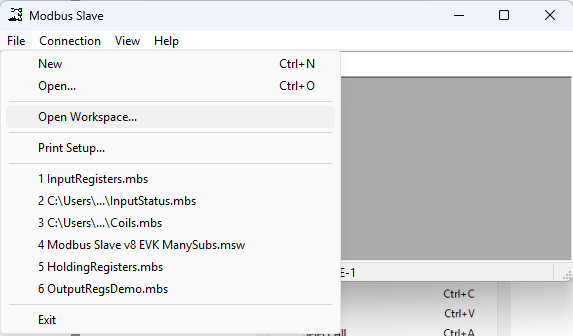 Figure 8. Open Workspace
Verify that the slave definition and communication settings match the Anybus Studio Modbus RTU host interface configuration.
Configure the simulation manually
Start the Modbus RTU Slave Simulator.
In the connection window, right‑click and select Slave Definition....
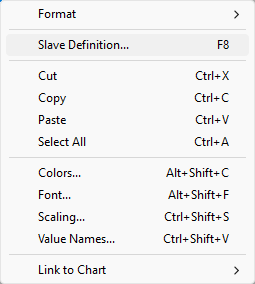 Figure 9. Slave Definition...
Configure the slave definition:
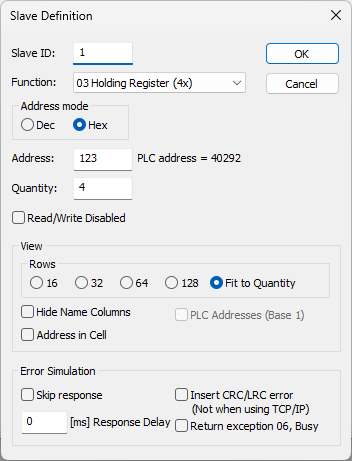
The settings shown are according to the Evaluation Board default configuration.
Figure 10. Slave Definition windowSlave ID: Match the Studio Modbus RTU host interface configuration.
Function: Select the Modbus function based on the data to read or write.
Address: Address of the parameter to access.
Quantity: Number of consecutive registers to read.
Save the slave definition.
Select Connection > Connect....
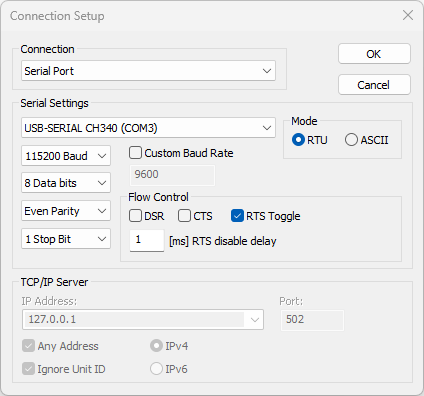
The settings shown are according to the Evaluation Board default configuration.
Figure 11. Connection Setup windowSelect the serial port to which the Evaluation Board is connected.
Configure the serial communication settings:
Baud rate: Match the Studio Modbus RTU host interface configuration
Parity: Match the Studio Modbus RTU host interface configuration
Stop bits: Match the Studio Modbus RTU host interface configuration
Data bits: Fixed to 8
Mode: Select RTU
Save the connection setup to start the Modbus RTU session.
Monitor Modbus RTU communication
When the connection is established, the Evaluation Board waits for a PROFINET master to connect.
When connected, Modbus RTU requests start automatically.
Monitor and log Modbus traffic in: Display > Communication.
To do next
Configure a PROFINET master and connect it to the Evaluation Board.
See Install PROFINET Master Simulator and Configure PROFINET Master Simulator.