Verify data exchange
When the Modbus RTU Slave Simulator and the PROFINET Master Simulator are running, data is copied between the networks.
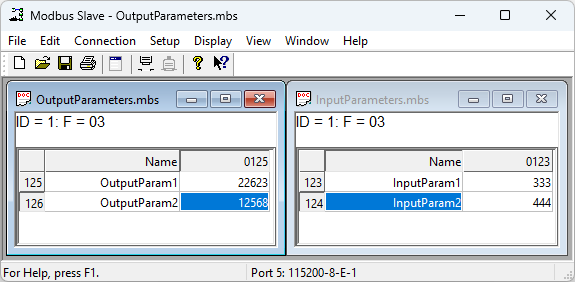
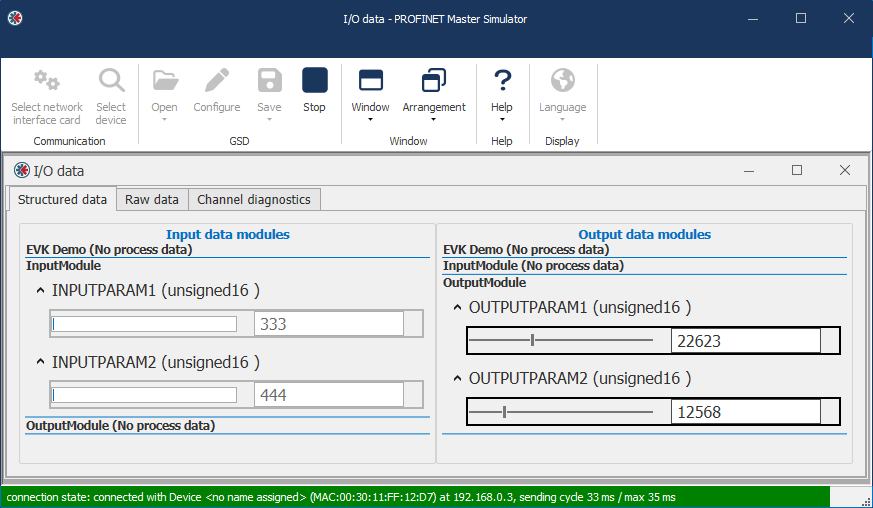 |
Verify input data: Modbus → PROFINET
Modbus Slave Simulator
Set values in the parameters InputParam1 and InputParam2.
PROFINET Master Simulator
Verify that the values are received in the InputModule parameters INPUTPARAM1 and INPUTPARAM2.
Verify output data: PROFINET → Modbus
PROFINET Master Simulator
Set values in the OutputModule parameters OUTPUTPARAM1 and OUTPUTPARAM2.
Modbus Slave Simulator
Verify that the values are received in the parameters OutputParam1 and OutputParam2.
Offline action
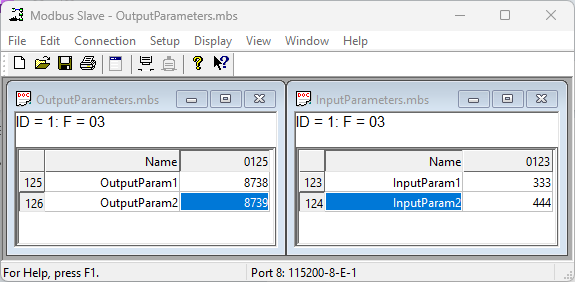
If the PROFINET network is stopped or disconnected, the configured offline action configured for the outputs is applied.
In this example, default values are assigned to OutputParam1 and OutputParam2.
Stop the PROFINET communication and verify that the output registers switch to the configured default values.
To do next
Once you have verified data exchange, your evaluation with the pre-installed configuration is complete.
To learn the full workflow, continue by creating your own configuration in Anybus Studio. See Create your first configuration in Anybus Studio.