Install a configuration on the Evaluation Board SoM
Use WebDAV to upload a HIFF configuration file to the Anybus System on Module (SoM) from a Windows PC.
About WebDAV
WebDAV is an extension of the HTTPS protocol that provides access to the file system of the Anybus System on Module (SoM).
Using WebDAV, you can transfer a HIFF configuration file from your computer to the Anybus System on Module (SoM) over a secure connection.
Before you begin
Connect the Evaluation Board
Ensure that:
The Evaluation Board is connected to your computer via Ethernet and powered. See Connecting the Evaluation Board.
Note
Configuration is transferred via Ethernet to the Anybus ONE SoM. The RS‑485 connection is not used.
The Evaluation Board network access is configured. See Set up Evaluation Board network access.
HIFF configuration file
Important
Only signed HIFF files can be installed on Anybus System on Module (SoM).
Ensure that you have a HIFF file containing the host interface configuration generated in Anybus Studio, and signed in the Anybus ONE Signing tool using the private key that corresponds to the public key provisioned on the target Anybus ONE SoM.
WebDAV client alternatives
In this procedure we use the built‑in Windows WebDAV client.
You can also use a third‑party WebDAV client, for example WinSCP, to access the file system.
Procedure
Upload the HIFF configuration file:
Right click This PC and select Map network drive....
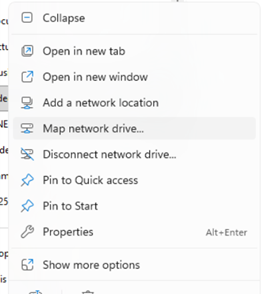 Figure 37. File Explorer, Map Network Drive
In the Folder field, enter the Evaluation Board address using the following format: http://<IP-address>:80/webdav.
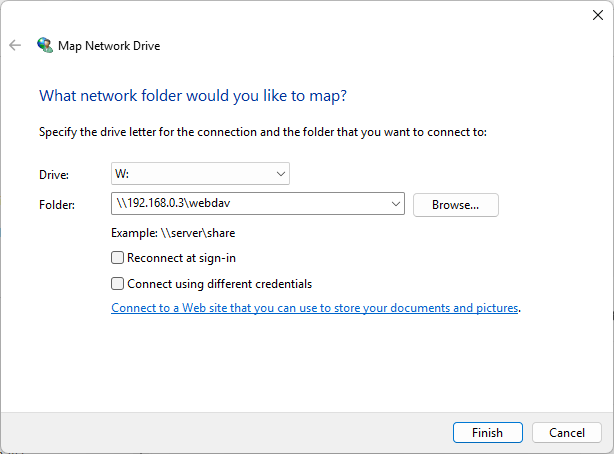 Figure 38. Map Network Drive, Folder
After the Evaluation Board file system is available as a network drive, copy the HIFF file to the firmware directory on the Evaluation Board.
To do next
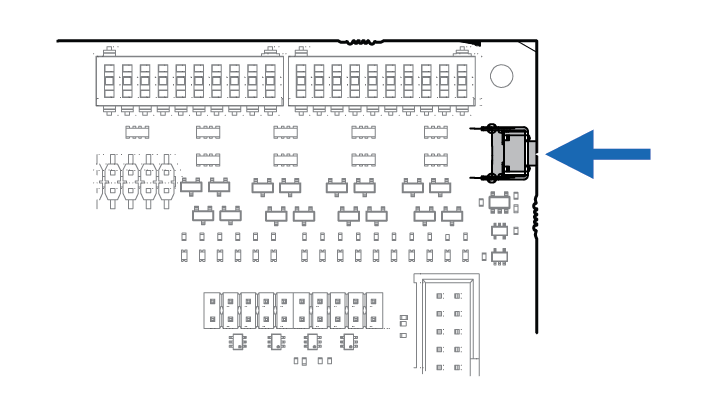 |
Press and release the Evaluation Board button for the configuration to take effect.
The MS LED starts flashing red, indicating that the configuration and firmware package is being installed.